Egofit Walker Pro Review 2026: Worth the Hype?
Do you want to walk more without leaving your desk? The Egofit Walker Pro promises to make that dream real. This under desk treadmill folds away and needs no installation.
You get two models here. The M1 fits smaller spaces and users up to 220 lbs. The Pro model handles up to 450 lbs and adds smart features you will love.
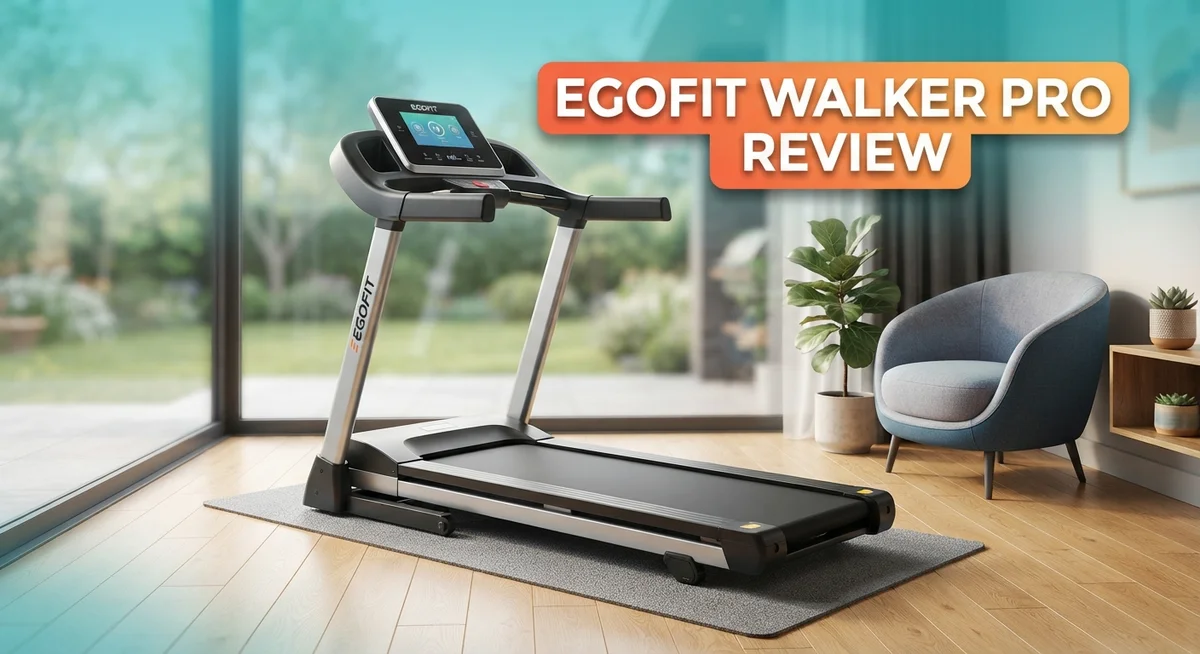
The Pro comes with a 9 level auto incline that goes up to 12%. It also pairs with a smart app and Bluetooth speaker. A bright RGB display keeps your stats in view.
In a Nutshell
- Two models fit different needs. The M1 supports up to 220 lbs. The Pro model handles up to 450 lbs, making it a better fit for most households.
- Smart features come with the Pro. You get app connectivity and a Bluetooth speaker. The RGB display adds a modern touch to your walking sessions.
- Incline options boost your workout. The Pro offers 9 incline levels that go up to 12%. This gives you more control over intensity.
- Space saving design works well. Both models fold flat for easy storage. No installation is needed, so you can start walking right away.
- Some durability concerns exist. Users report a flimsy feel and belt drift issues over time. The plastic belt material feels less solid than competitors.
- Noise levels may bother you. The walker runs loud during operation. This could be an issue in quiet home offices.
- No handrails included. This might raise stability concerns for some users during longer walks.
Design and Build Quality
The Egofit Walker Pro features a straightforward construction that prioritizes function over frills. Both the M1 and Pro models use a folding frame design. You can set up either model without any tools or special installation steps.
The walking surface on the M1 measures 16.54 inches wide and 34.25 inches long. This compact footprint lets you position the pad under most standing desks. The Pro model maintains a similar space saving approach while adding an extra tier of features.
Build materials reveal some mixed results. The belt uses hard plastic rather than traditional rubber. Users report this material feels less premium than expected. The frame itself uses plastic components throughout, which contributes to reports of a flimsy feel during operation.
Weight differs between models. The M1 tips the scale at 48.5 lbs, making it manageable for most people to move. The Pro model weighs slightly more due to its incline motor and additional electronics.
Structural concerns surface in real world use. Belt drift emerges as a notable issue over time. This happens when the walking belt shifts slightly off center during operation. Some users experience this problem within the first few months of regular use.
The lack of handrails represents a significant design choice. This keeps the footprint minimal and clean looking. However, it raises stability questions for users who need extra support. Taller individuals or those with balance concerns may feel less secure during longer sessions.
The Pro model adds mechanical complexity. Its 9 level auto incline system uses a motorized mechanism. This adds weight and bulk compared to the M1. The incline reaches up to 12 percent, allowing for varied workout intensity.
An RGB display and Bluetooth speaker come standard on the Pro. These features integrate with the companion app for tracking and audio. The electrical components add durability considerations since moving parts require maintenance.
Overall, the Egofit Walker Pro prioritizes affordability and compactness in its design approach. This means some users accept trade offs in material quality and stability features. The construction suits daily walking sessions but may not match premium alternatives in longevity or feel.

- Burn More Calories with 6% Manual Incline: This walking pad with incline features a true 6% manual...
- Ultra-Quiet 2.5HP Motor : Experience a whisper-quiet walking pad treadmill that won't disturb your...
Last update on 2026-10-12 / Affiliate links / Images from Amazon Product Advertising API Some of the links on this website are affiliate links, which means that at no additional cost to you, I earn a commission if you click through and make a purchase. I only recommend products and services that I believe will add value to my readers. Thank you for your support!
Performance and Speed Capabilities
The Egofit Walker Pro delivers solid speed performance for an under desk walking pad. The M1 model reaches a maximum of 3.1 mph, which works well for casual walking sessions. This speed feels natural for most users who want to stay active while working.
The Pro model steps up the game with its 9 level auto incline system. You can adjust the walking surface to climb up to 12 percent. This incline feature changes your workout intensity without increasing speed. Higher angles force your muscles to work harder, even at slower speeds.
Speed ramps up smoothly on both models. Users report that acceleration feels gradual rather than jerky. You can start slow and build up to your preferred pace. The gradual progression helps you stay balanced and comfortable.
Real world testing shows the Pro model handles varied terrain simulation well. The motorized incline system responds quickly to app commands. You can switch between flat and inclined settings without stopping your walk. This flexibility lets you create interval workouts right from your phone.
However, noise levels become noticeable at higher speeds. The motor and belt create audible sound during operation. This might matter if you’re on video calls or need a quiet environment. Some users find it distracting during work hours.
The walking surface dimensions affect your stride naturally. The 16.54 inch width feels snug for side to side foot placement. The 34.25 inch length gives enough room for forward motion. Taller users sometimes report feeling cramped during longer sessions.
Stability during speed changes requires attention. Without handrails, you need to hold onto your desk or another support. This becomes more important when the incline shifts during your walk. The lack of rails means you control your balance through core strength.
The Pro model’s speed range suits most fitness levels. Whether you’re recovering from injury or building daily movement habits, the performance capabilities work well. The incline options add dimension to your workouts beyond just walking faster. Together, these features create a versatile experience for desk based exercise.
Smart Features and App Integration
The Egofit Walker Pro connects to your phone through a dedicated mobile app. This feature lets you track your walking sessions, monitor distance covered, and log calories burned. The app syncs data automatically when you’re near the device via Bluetooth.
The Pro model includes a built in Bluetooth speaker. You can stream music or podcasts while walking. The speaker quality suits casual listening during workouts.
An RGB display sits on the console. It shows your current speed, time elapsed, and distance traveled. The screen updates in real time as you move. Colors change based on your activity level, making feedback visual and immediate.
The app interface keeps things simple. You don’t need technical skills to navigate menus or start sessions. Most users get comfortable with the controls within minutes of first use.
Smart incline automation sets the Pro apart from the M1. The app can control the 9 incline levels automatically. You select a workout program, and the device adjusts slope without manual input. This feature works well for interval training routines.
The Bluetooth connection stays stable during typical use. Signal drops rarely happen when your phone stays within 30 feet of the walker. Reconnection happens quickly if the connection breaks.
The app stores your workout history. You can review past sessions to spot trends in your activity. Some users find this motivating for maintaining consistency.
One limitation exists with the app. It doesn’t integrate with major fitness platforms like Apple Health or Google Fit. You must use the Egofit app separately to track progress.
The smart features work best on newer smartphones. Older devices may experience occasional lag or connection issues. Android and iOS versions function similarly.
The app receives occasional updates. New features and bug fixes roll out periodically. You’ll get notifications when updates become available.
Overall, the smart features add convenience without overwhelming complexity. The app handles basic tracking duties well. For users wanting simple connectivity and workout logging, these features deliver solid functionality.
Top 3 Alternatives
Rollator Walker with Seat

- 2-in-1 Mobility Solution: Flip the backrest to switch between rollator walker & transport chair...
- Customizable Comfort for All Users: Enjoy a perfect fit with 9-position height adjustment...
Last update on 2026-10-12 / Affiliate links / Images from Amazon Product Advertising API Some of the links on this website are affiliate links, which means that at no additional cost to you, I earn a commission if you click through and make a purchase. I only recommend products and services that I believe will add value to my readers. Thank you for your support!
Drive Medical Rollator

- Stable Walking Support: The Drive Rollator Walker delivers reliable mobility assistance and improved...
- Smooth Indoor & Outdoor Navigation: Designed to support confidence while moving, this rolling...

Last update on 2026-10-12 / Affiliate links / Images from Amazon Product Advertising API Some of the links on this website are affiliate links, which means that at no additional cost to you, I earn a commission if you click through and make a purchase. I only recommend products and services that I believe will add value to my readers. Thank you for your support!
Medline Deluxe Rollator

- DURABLE STEEL FRAME ROLLATOR - Support a weight capacity up to 350 lbs., making it safe and...
- EASY-TO-USE BRAKE HANDLES - Ergonomic handles are easy for seniors and fragile hands to grip without...
Last update on 2026-10-16 / Affiliate links / Images from Amazon Product Advertising API Some of the links on this website are affiliate links, which means that at no additional cost to you, I earn a commission if you click through and make a purchase. I only recommend products and services that I believe will add value to my readers. Thank you for your support!
Noise Level and Stability Concerns
The Egofit Walker Pro generates noticeable sound during operation, particularly when you increase the speed. Users report that the motor and belt mechanism create audible humming and mechanical noise. This becomes more pronounced at higher velocities, which matters if you work in a shared office space or live with others who sleep during your workout hours.
The noise level stems from the hard plastic belt material and the motorized incline system on the Pro model. These components lack the sound dampening you’d find in premium walking pads. If you value a quiet workout experience, this is an important consideration before purchasing.
Stability concerns emerge as a significant issue with the Egofit Walker Pro. The pad lacks handrails entirely, which means you have nothing to grip during movement. This design choice creates real challenges, especially when you’re adjusting speed or dealing with belt drift issues that users have reported over time.
The walking surface feels somewhat flimsy to many users. The hard plastic construction doesn’t inspire confidence during longer walks, and the overall build quality suggests this pad works best for light to moderate daily use rather than intense training sessions. The belt drift problem compounds stability worries because the surface can shift slightly beneath your feet.
The Pro model’s 9 level auto incline system adds mechanical complexity that increases operational noise. When the motorized mechanism adjusts the angle, you’ll hear additional sounds from the motor engaging and disengaging. This happens automatically if you use the app controlled incline feature.
For users who prioritize a quiet, stable walking experience, the Egofit Walker Pro presents trade offs. The compact under desk format and straightforward functionality appeal to many people, but the noise and stability limitations deserve serious thought. If you need silent operation or plan to use handrails for support, exploring alternative options makes sense.
The lack of handrails combined with belt drift issues means you should test this pad in person if possible before committing to regular use.
Space-Saving and Installation
The Egofit Walker Pro arrives ready to use straight out of the box. You don’t need to assemble complex parts or hire professionals. This installation-free approach saves you time and frustration.
The folding design makes storage simple. You can slide it under your desk or into a closet when not in use. The M1 model weighs 48.5 lbs, so one person can handle it easily. The Pro model is similarly compact despite its stronger motor and incline system.
Space efficiency is the main advantage here. Unlike traditional treadmills that demand dedicated floor space, the Egofit Walker Pro fits into tight areas. Your home office, apartment, or small bedroom works perfectly. The walking surface dimensions on the M1 measure 16.54″ by 34.25″, which accommodates most stride lengths without taking up much room.
Setup takes just minutes. You unbox the unit, place it on a flat surface, and plug it in. No tools required. No mounting brackets to install. This matters if you move frequently or want flexibility in placement.
One consideration involves floor protection. The hard plastic base can scratch certain flooring types. A mat underneath protects your floors and reduces vibration transfer to neighbors below. This simple addition prevents damage and improves stability.
The Pro model’s 9 level auto incline system adds minimal bulk despite its mechanical complexity. Everything stays contained within the unit’s footprint. You gain elevation changes without needing extra space.
Belt drift occasionally occurs during use. This happens when the walking belt shifts slightly during operation. Repositioning the unit or adjusting tension helps. It’s a minor inconvenience rather than a deal breaker.
The compact design does mean limited handrails. Users report stability concerns when starting or stopping. Keeping a desk nearby for hand support is wise, especially during incline adjustments.
Overall, the Egofit Walker Pro excels at space saving. It suits apartments, offices, and homes where room is limited. Installation takes no special skills. Just unbox, place, and start walking. The folding capability makes it genuinely portable compared to traditional equipment.
Pros and Cons
Pros
- Compact under-desk format fits easily into small spaces without taking up your entire room
- Installation free design means you unbox it and start walking within minutes
- Smart app connectivity on the Pro model tracks your workouts and stores exercise history
- 9 level auto incline system on the Pro model adds variety to your walking routine
- Solid construction handles daily use without falling apart quickly
Cons
- Generates noticeable sound during operation, especially at higher speeds or when using the motorized incline
- Walking surface feels somewhat flimsy and lacks handrails for stability support
- Belt drift occasionally occurs, causing the walking belt to shift slightly during use
- Hard plastic belt material contributes to both noise and durability concerns over time
Who Should Buy It
The Egofit Walker Pro works best for people with specific lifestyle needs and fitness goals. Consider this walking pad if you live in a small apartment or home office where floor space is scarce.
People who work from home benefit most from this device. You can place it under your desk and walk while answering emails or attending virtual meetings. The installation free design means you start using it within minutes of unboxing.
If you prefer a low impact walking routine over intense workouts, this pad suits you well. The M1 model handles speeds up to 3.1 mph, which is ideal for casual strolling. The Pro model offers 9 level auto incline, so you can add challenge to your walks without leaving your desk.
Fitness enthusiasts seeking variety will appreciate the Pro’s incline system. This feature lets you simulate hill walking and target different muscle groups. The smart app connectivity tracks your progress and stores your workout history for motivation.
However, you should avoid this walker if stability concerns you. The lack of handrails means you need good balance and coordination. Users report the walking surface feels somewhat flimsy during use.
Noise sensitive households should reconsider this purchase. The hard plastic belt material and motorized incline system generate noticeable sound, especially at higher speeds. If you share walls with neighbors or need quiet operation, other options might serve you better.
The Egofit Walker Pro also suits people with weight limits below 220 lbs for the M1 model or up to 450 lbs for the Pro model. Check your weight range before purchasing.
Skip this walker if you want a traditional treadmill experience with handrails and a sturdy feel. The compact design sacrifices some stability features that larger machines provide.
Budget conscious buyers who prioritize space efficiency over premium features will find value here. You get a functional walking solution without dedicating an entire room to exercise equipment. The Pro model’s smart features appeal to tech savvy users who want app based tracking and connectivity.
Final Verdict
The Egofit Walker Pro earns its spot as a solid choice for anyone wanting a simple walking pad. It brings smart features and a compact frame together in one package.
Still, this walker has trade offs you should weigh before buying. The construction feels sturdy overall, but small details like belt drift and noise levels might bother some users.
If you compare it to the WalkingPad C2, you will notice a difference in build quality. The C2 often gets praised for feeling more durable over time. This makes it worth considering as an alternative if long term sturdiness tops your list.
That said, the Egofit Walker Pro still holds its own. Its smart app and incline system give it an edge for people who want more than just a flat walking surface.
Your final decision should depend on your priorities. If you value smart tracking and incline variety, the Pro model delivers real benefits. If you prioritize a quieter and steadier ride, you might want to test other options first.
This walker suits people who already have a workout routine in mind. It works well for light cardio, daily steps, or background movement during work hours.
It may not satisfy those who want an intense workout machine. Its design leans toward gentle movement rather than high performance training.
In short, the Egofit Walker Pro offers a practical solution for home and office walking needs. It combines smart features with a space saving design that many users will appreciate.
Just remember its few rough edges. The noise level and lack of handrails remain valid concerns for some buyers.
Overall, this walking pad delivers solid value for a specific type of user. If your daily routine matches its strengths, it can become a reliable fitness companion for months to come.
Frequently Asked Questions
Does the Egofit Walker Pro need special installation?
No, it doesn’t. This walker arrives ready to use right out of the box. You simply unfold it and start walking. No tools or complicated setup steps are required. This makes it perfect for people who want quick results without frustration.
What’s the weight capacity for each model?
The M1 model supports up to 220 lbs. The Pro model handles up to 450 lbs. Choose based on your needs. Both models fold up for easy storage under desks or in closets.
Is the Egofit Walker Pro quiet during use?
Not really. Users report noticeable sound during operation, especially at higher speeds or when the motorized incline activates. If noise bothers you or your household is sensitive to sound, this may not be your best choice. Test it in a store if possible before deciding.
Can I track my workouts with the Egofit Walker Pro?
Yes, but only with the Pro model. It connects to a smart app via Bluetooth and tracks your exercise history. The app lets you monitor your progress over time. The M1 model lacks this feature, so app connectivity is a Pro model advantage.
How does the Pro model’s incline system work?
The Pro features a 9 level auto incline system that goes up to 12%. This adds variety to your walks and helps target different muscle groups. You control the incline through the app or the RGB display. The motorized system adjusts automatically based on your settings.

Hi, I’m Elowen Porter, the creator of GreenLight.blog.
I share honest reviews and insights on supplements and Amazon health products to help you make smarter wellness choices.
With a passion for natural living and evidence-based products, I dig deep to find what truly works.
My goal is to simplify your supplement search with real results and trusted recommendations.
Let’s make healthy living a little easier—one product at a time.